---
title: How to delete a Report - Visitor
description: Knowledge Base
---
[Skip to content](https://knowledge.sgworld.com/how-to-delete-a-report-#main-content)
English
Show submenu for translations
[More support](https://knowledge.sgworld.com/kb-tickets/new?hsLang=en) [Customer portal](https://knowledge.sgworld.com/mytickets?hsLang=en)

Open main navigation
Close main navigation
- English
Show submenu for translations
- [More support](https://knowledge.sgworld.com/kb-tickets/new)
- [Customer portal](https://knowledge.sgworld.com/mytickets)
Find your answers here
- There are no suggestions because the search field is empty.
1. [Knowledge Base](https://knowledge.sgworld.com/?hsLang=en)
# How to delete a Report - Visitor
## This guide is to walk the reader through how to delete a report.
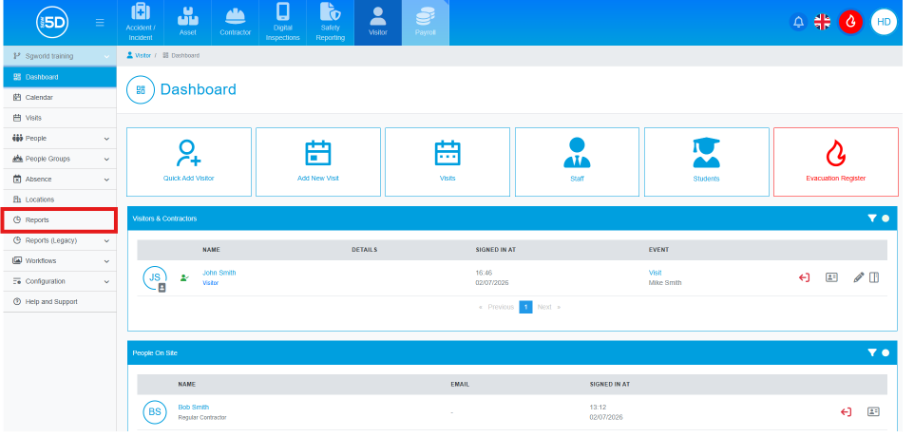
1. From the visitor module, use the left‑hand navigation panel and click **Reports**.
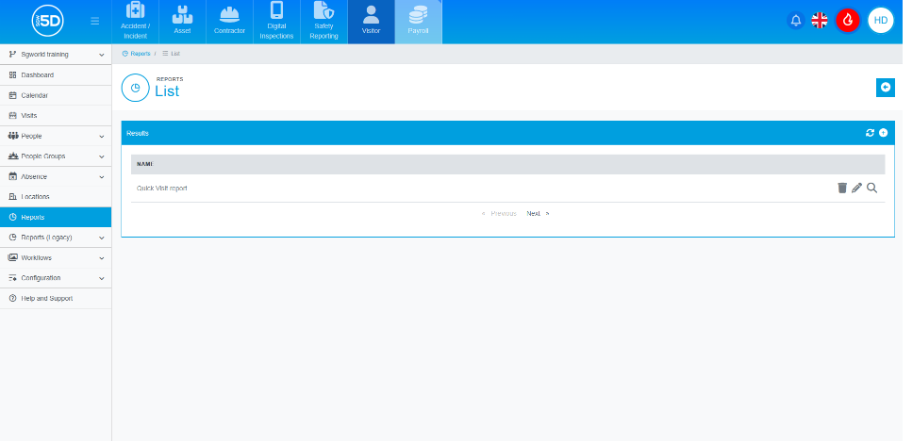
2. This will take you to the report overview page. Here, you will be able to run any pre‑existing reports, either those created by you or by anyone else in your company.
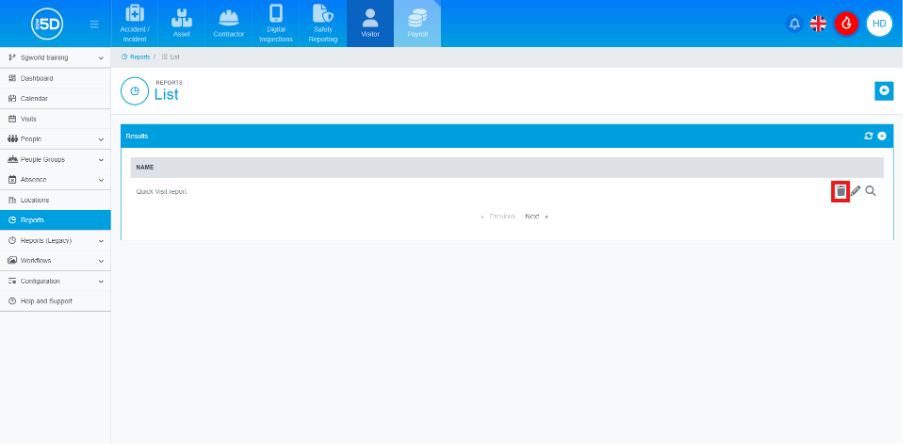
3. To delete a report, click the **bin icon** on the row of report you want to delete.
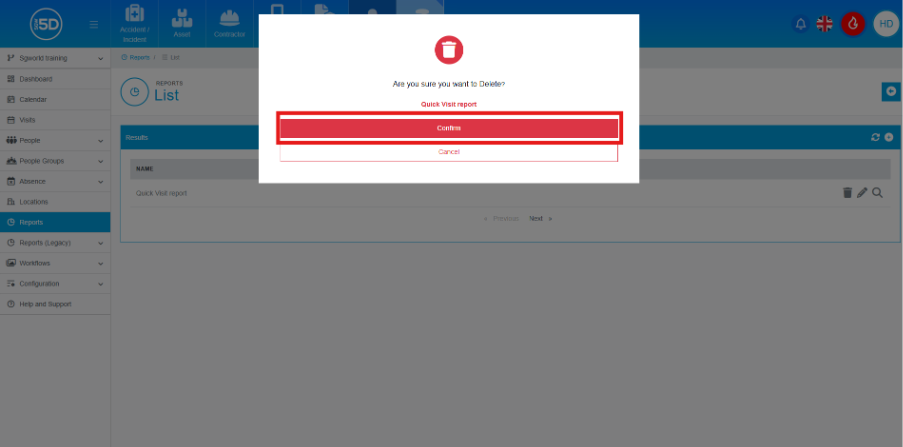
4. An overlay will appear to confirm the deletion. Click the Confirm button to finalise the deletion.
- [Recent Updates](https://knowledge.sgworld.com/recent-updates?hsLang=en#main-content)
- [24/08/2026](https://knowledge.sgworld.com/recent-updates?hsLang=en#24-08-2026)
- [13/07/2026](https://knowledge.sgworld.com/recent-updates?hsLang=en#13-07-2026)
- [30/06/2026](https://knowledge.sgworld.com/recent-updates?hsLang=en#30-06-2026)
- [25/04/2026](https://knowledge.sgworld.com/recent-updates?hsLang=en#25-04-2026)
- [12/03/2026](https://knowledge.sgworld.com/recent-updates?hsLang=en#12-03-2026)
- [05/02/2026](https://knowledge.sgworld.com/recent-updates?hsLang=en#05-02-2026)
- [15/12/2025](https://knowledge.sgworld.com/recent-updates?hsLang=en#15-12-2025)
- [11/12/2025](https://knowledge.sgworld.com/recent-updates?hsLang=en#11-12-2025)
- [10/12/2025](https://knowledge.sgworld.com/recent-updates?hsLang=en#10-12-2025)
- [08/12/2025](https://knowledge.sgworld.com/recent-updates?hsLang=en#08-12-2025)
- [24/11/2025](https://knowledge.sgworld.com/recent-updates?hsLang=en#24-11-2025)
- [SGW5D System Guides](https://knowledge.sgworld.com/sgw5d-system-guides?hsLang=en#main-content)
- [Accounts](https://knowledge.sgworld.com/sgw5d-system-guides?hsLang=en#accounts)
- [System](https://knowledge.sgworld.com/sgw5d-system-guides?hsLang=en#system)
- [Roles](https://knowledge.sgworld.com/sgw5d-system-guides?hsLang=en#roles)
- [SGW5D People Guides](https://knowledge.sgworld.com/sgw5d-people-guides?hsLang=en#main-content)
- [Visitor](https://knowledge.sgworld.com/sgw5d-people-guides?hsLang=en#visitor)
- [Contractor](https://knowledge.sgworld.com/sgw5d-people-guides?hsLang=en#contractor)
- [Regular Contractors](https://knowledge.sgworld.com/sgw5d-people-guides?hsLang=en#regular-contractors)
- [Staff](https://knowledge.sgworld.com/sgw5d-people-guides?hsLang=en#staff)
- [Locations](https://knowledge.sgworld.com/sgw5d-people-guides?hsLang=en#locations)
- [Student](https://knowledge.sgworld.com/sgw5d-people-guides?hsLang=en#student)
- [SGW5D Visitor Guides](https://knowledge.sgworld.com/sgw5d-visitor-guides?hsLang=en#main-content)
- [Absence](https://knowledge.sgworld.com/sgw5d-visitor-guides?hsLang=en#absence)
- [Dashboard](https://knowledge.sgworld.com/sgw5d-visitor-guides?hsLang=en#dashboard)
- [Configuration](https://knowledge.sgworld.com/sgw5d-visitor-guides?hsLang=en#configuration)
- [Reports](https://knowledge.sgworld.com/sgw5d-visitor-guides?hsLang=en#reports)
- [SGW5D Contractor Management Guides](https://knowledge.sgworld.com/sgw5d-contractor-management-guides?hsLang=en#main-content)
- [Job Creation](https://knowledge.sgworld.com/sgw5d-contractor-management-guides?hsLang=en#job-creation)
- [Company Documents](https://knowledge.sgworld.com/sgw5d-contractor-management-guides?hsLang=en#company-documents)
- [Company Types](https://knowledge.sgworld.com/sgw5d-contractor-management-guides?hsLang=en#company-types)
- [Permits](https://knowledge.sgworld.com/sgw5d-contractor-management-guides?hsLang=en#permits)
- [Reports](https://knowledge.sgworld.com/sgw5d-contractor-management-guides?hsLang=en#reports)
- [SGW5D Asset Management Guide](https://knowledge.sgworld.com/sgw5d-asset-management-guide?hsLang=en#main-content)
- [Items](https://knowledge.sgworld.com/sgw5d-asset-management-guide?hsLang=en#items)
- [Audit](https://knowledge.sgworld.com/sgw5d-asset-management-guide?hsLang=en#audit)
- [Helpdesk](https://knowledge.sgworld.com/sgw5d-asset-management-guide?hsLang=en#helpdesk)
- [Configuration](https://knowledge.sgworld.com/sgw5d-asset-management-guide?hsLang=en#configuration)
- [SGW5D Touchscreen Guides](https://knowledge.sgworld.com/sgw5d-touchscreen-guides?hsLang=en#main-content)
- [Create/ Change](https://knowledge.sgworld.com/sgw5d-touchscreen-guides?hsLang=en#create-change)
- [Delete](https://knowledge.sgworld.com/sgw5d-touchscreen-guides?hsLang=en#delete)
- [SGW5D Workflow Guides](https://knowledge.sgworld.com/sgw5d-workflow-guides?hsLang=en#main-content)
- [Stage Creation](https://knowledge.sgworld.com/sgw5d-workflow-guides?hsLang=en#stage-creation)
- [Workflow Creation](https://knowledge.sgworld.com/sgw5d-workflow-guides?hsLang=en#workflow-creation)
- [Induction Creation](https://knowledge.sgworld.com/sgw5d-workflow-guides?hsLang=en#induction-creation)
- [Visit Types](https://knowledge.sgworld.com/sgw5d-workflow-guides?hsLang=en#visit-types)
- [SGW5D People Groups Guides](https://knowledge.sgworld.com/sgw5d-people-groups-guides?hsLang=en#main-content)
- [Evacuation Groups](https://knowledge.sgworld.com/sgw5d-people-groups-guides?hsLang=en#evacuation-groups)
- [Class](https://knowledge.sgworld.com/sgw5d-people-groups-guides?hsLang=en#class)
- [Departments](https://knowledge.sgworld.com/sgw5d-people-groups-guides?hsLang=en#departments)
- [Contact Us](https://knowledge.sgworld.com/contact-us?hsLang=en)
- [App](https://knowledge.sgworld.com/app?hsLang=en#main-content)
- [Contractor](https://knowledge.sgworld.com/app?hsLang=en#contractor)
- [Asset](https://knowledge.sgworld.com/app?hsLang=en#asset)
- [System](https://knowledge.sgworld.com/app?hsLang=en#system)
[](http://sgworld.com)
[mailto:email@email.com](mailto:email@email.com)
Copyright © 2025, SG World
```json
{
"@context" : "https://schema.org",
"@type" : "VideoObject",
"caption" : {
"@type" : "MediaObject",
"contentUrl" : "https://knowledge.sgworld.com/media-transcripts/217598562722/en.vtt",
"inLanguage" : "en",
"name" : "en Captions"
},
"contentUrl" : "https://7964242.fs1.hubspotusercontent-na1.net/hubfs/7964242/video_assets/217598562722/inherited/web_optimized.mp4",
"dateModified" : "2026-07-21T09:09:34.405Z",
"duration" : "PT45S",
"height" : 1080,
"name" : "How to delete a report 1",
"thumbnailUrl" : "https://7964242.fs1.hubspotusercontent-na1.net/hubfs/7964242/How%20to%20delete%20a%20report%20%201.mp4/medium.jpg",
"uploadDate" : "2026-07-21T09:09:26.658Z",
"width" : 1920
}
```