---
title: How to delete a Note
description: This guide is to walk the reader through how to delete a note.
---
[Skip to content](https://knowledge.sgworld.com/how-to-delete-a-note#main-content)
English
Show submenu for translations
[More support](https://knowledge.sgworld.com/kb-tickets/new?hsLang=en) [Customer portal](https://knowledge.sgworld.com/mytickets?hsLang=en)

Open main navigation
Close main navigation
- English
Show submenu for translations
- [More support](https://knowledge.sgworld.com/kb-tickets/new)
- [Customer portal](https://knowledge.sgworld.com/mytickets)
Find your answers here
- There are no suggestions because the search field is empty.
1. [Knowledge Base](https://knowledge.sgworld.com/?hsLang=en)
2. [SGW5D People Guides](https://knowledge.sgworld.com/sgw5d-people-guides?hsLang=en)
# How to delete a Note
## This guide is to walk the reader through how to delete a note.
1. 1. Most record types in the system can have notes added. These notes can also be deleted. I will demonstrate how to remove a note from a staff record, but these steps can be applied to any record type.
2. To delete a note from a staff record, from any module, click the ‘People’ section on the left-hand side.
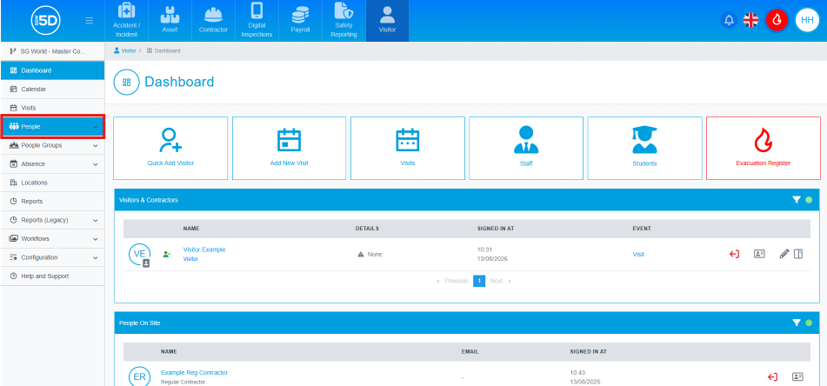
3. Then click ‘Staff’.
**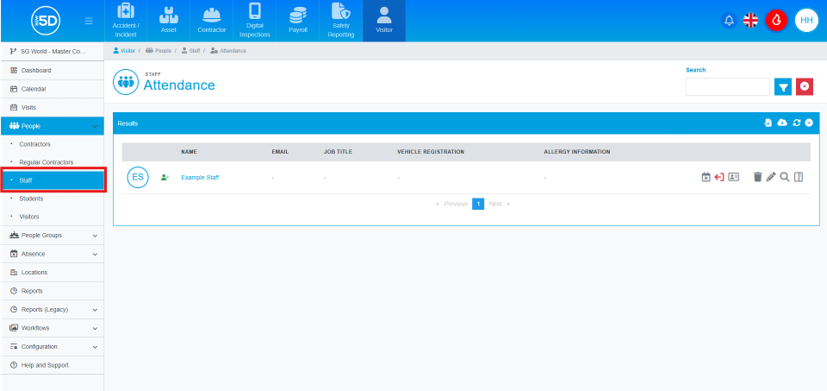**
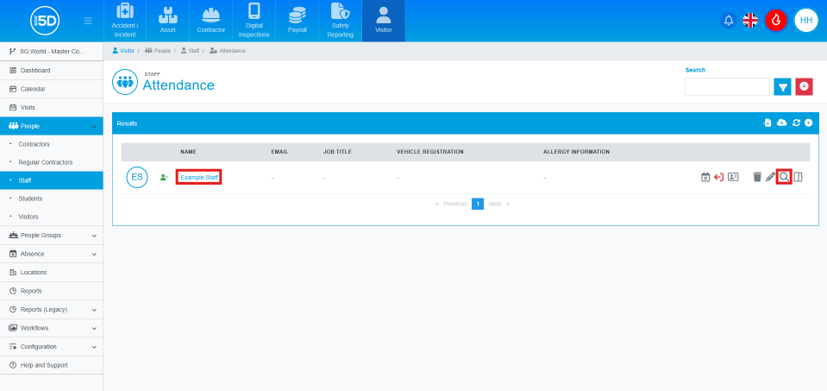
4. This will take you to the overview page of your staff members. To delete a note, you will first need to view the record by clicking the name of the record or the magnifying glass icon.
****
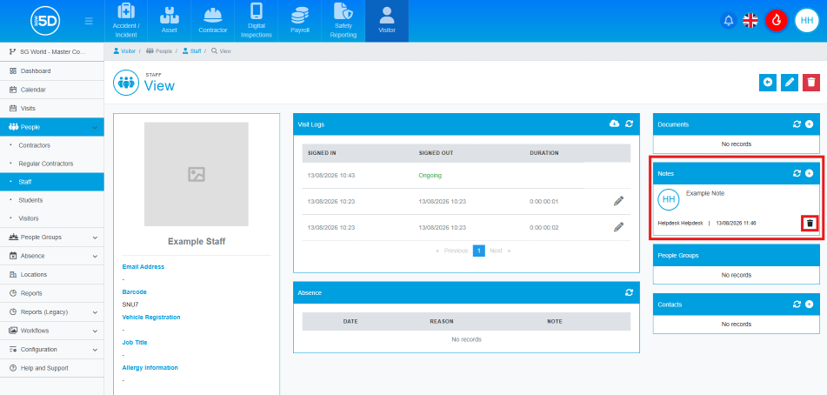
5. In the ‘Notes’ section on the right-hand side of the screen, locate the note you wish to delete and click the bin icon beneath that note.
**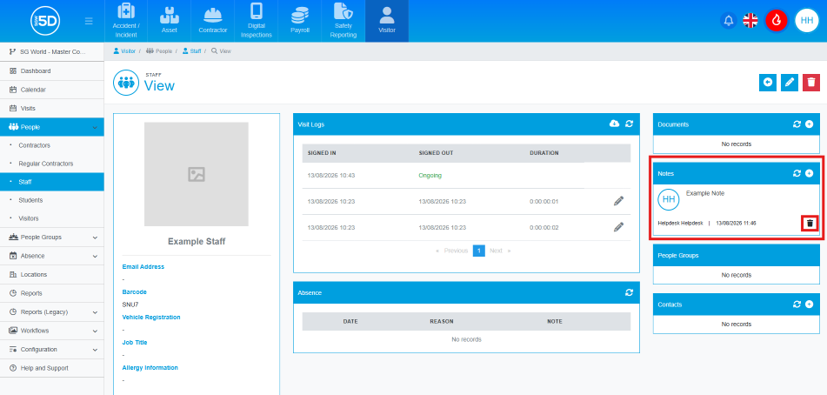**
6. An overlay will appear asking you to confirm the deletion. To complete the process, click ‘Confirm’.
****
- [Recent Updates](https://knowledge.sgworld.com/recent-updates?hsLang=en#main-content)
- [24/08/2026](https://knowledge.sgworld.com/recent-updates?hsLang=en#24-08-2026)
- [13/07/2026](https://knowledge.sgworld.com/recent-updates?hsLang=en#13-07-2026)
- [30/06/2026](https://knowledge.sgworld.com/recent-updates?hsLang=en#30-06-2026)
- [25/04/2026](https://knowledge.sgworld.com/recent-updates?hsLang=en#25-04-2026)
- [12/03/2026](https://knowledge.sgworld.com/recent-updates?hsLang=en#12-03-2026)
- [05/02/2026](https://knowledge.sgworld.com/recent-updates?hsLang=en#05-02-2026)
- [15/12/2025](https://knowledge.sgworld.com/recent-updates?hsLang=en#15-12-2025)
- [11/12/2025](https://knowledge.sgworld.com/recent-updates?hsLang=en#11-12-2025)
- [10/12/2025](https://knowledge.sgworld.com/recent-updates?hsLang=en#10-12-2025)
- [08/12/2025](https://knowledge.sgworld.com/recent-updates?hsLang=en#08-12-2025)
- [24/11/2025](https://knowledge.sgworld.com/recent-updates?hsLang=en#24-11-2025)
- [SGW5D System Guides](https://knowledge.sgworld.com/sgw5d-system-guides?hsLang=en#main-content)
- [Accounts](https://knowledge.sgworld.com/sgw5d-system-guides?hsLang=en#accounts)
- [System](https://knowledge.sgworld.com/sgw5d-system-guides?hsLang=en#system)
- [Roles](https://knowledge.sgworld.com/sgw5d-system-guides?hsLang=en#roles)
- [SGW5D People Guides](https://knowledge.sgworld.com/sgw5d-people-guides?hsLang=en#main-content)
- [Visitor](https://knowledge.sgworld.com/sgw5d-people-guides?hsLang=en#visitor)
- [Contractor](https://knowledge.sgworld.com/sgw5d-people-guides?hsLang=en#contractor)
- [Regular Contractors](https://knowledge.sgworld.com/sgw5d-people-guides?hsLang=en#regular-contractors)
- [Staff](https://knowledge.sgworld.com/sgw5d-people-guides?hsLang=en#staff)
- [Locations](https://knowledge.sgworld.com/sgw5d-people-guides?hsLang=en#locations)
- [Student](https://knowledge.sgworld.com/sgw5d-people-guides?hsLang=en#student)
- [SGW5D Visitor Guides](https://knowledge.sgworld.com/sgw5d-visitor-guides?hsLang=en#main-content)
- [Absence](https://knowledge.sgworld.com/sgw5d-visitor-guides?hsLang=en#absence)
- [Dashboard](https://knowledge.sgworld.com/sgw5d-visitor-guides?hsLang=en#dashboard)
- [Configuration](https://knowledge.sgworld.com/sgw5d-visitor-guides?hsLang=en#configuration)
- [Reports](https://knowledge.sgworld.com/sgw5d-visitor-guides?hsLang=en#reports)
- [SGW5D Contractor Management Guides](https://knowledge.sgworld.com/sgw5d-contractor-management-guides?hsLang=en#main-content)
- [Job Creation](https://knowledge.sgworld.com/sgw5d-contractor-management-guides?hsLang=en#job-creation)
- [Company Documents](https://knowledge.sgworld.com/sgw5d-contractor-management-guides?hsLang=en#company-documents)
- [Company Types](https://knowledge.sgworld.com/sgw5d-contractor-management-guides?hsLang=en#company-types)
- [Permits](https://knowledge.sgworld.com/sgw5d-contractor-management-guides?hsLang=en#permits)
- [Reports](https://knowledge.sgworld.com/sgw5d-contractor-management-guides?hsLang=en#reports)
- [SGW5D Asset Management Guide](https://knowledge.sgworld.com/sgw5d-asset-management-guide?hsLang=en#main-content)
- [Items](https://knowledge.sgworld.com/sgw5d-asset-management-guide?hsLang=en#items)
- [Audit](https://knowledge.sgworld.com/sgw5d-asset-management-guide?hsLang=en#audit)
- [Helpdesk](https://knowledge.sgworld.com/sgw5d-asset-management-guide?hsLang=en#helpdesk)
- [Configuration](https://knowledge.sgworld.com/sgw5d-asset-management-guide?hsLang=en#configuration)
- [SGW5D Touchscreen Guides](https://knowledge.sgworld.com/sgw5d-touchscreen-guides?hsLang=en#main-content)
- [Create/ Change](https://knowledge.sgworld.com/sgw5d-touchscreen-guides?hsLang=en#create-change)
- [Delete](https://knowledge.sgworld.com/sgw5d-touchscreen-guides?hsLang=en#delete)
- [SGW5D Workflow Guides](https://knowledge.sgworld.com/sgw5d-workflow-guides?hsLang=en#main-content)
- [Stage Creation](https://knowledge.sgworld.com/sgw5d-workflow-guides?hsLang=en#stage-creation)
- [Workflow Creation](https://knowledge.sgworld.com/sgw5d-workflow-guides?hsLang=en#workflow-creation)
- [Induction Creation](https://knowledge.sgworld.com/sgw5d-workflow-guides?hsLang=en#induction-creation)
- [Visit Types](https://knowledge.sgworld.com/sgw5d-workflow-guides?hsLang=en#visit-types)
- [SGW5D People Groups Guides](https://knowledge.sgworld.com/sgw5d-people-groups-guides?hsLang=en#main-content)
- [Evacuation Groups](https://knowledge.sgworld.com/sgw5d-people-groups-guides?hsLang=en#evacuation-groups)
- [Class](https://knowledge.sgworld.com/sgw5d-people-groups-guides?hsLang=en#class)
- [Departments](https://knowledge.sgworld.com/sgw5d-people-groups-guides?hsLang=en#departments)
- [Contact Us](https://knowledge.sgworld.com/contact-us?hsLang=en)
- [App](https://knowledge.sgworld.com/app?hsLang=en#main-content)
- [Contractor](https://knowledge.sgworld.com/app?hsLang=en#contractor)
- [Asset](https://knowledge.sgworld.com/app?hsLang=en#asset)
- [System](https://knowledge.sgworld.com/app?hsLang=en#system)
[](http://sgworld.com)
[mailto:email@email.com](mailto:email@email.com)
Copyright © 2025, SG World
```json
{
"@context" : "https://schema.org",
"@type" : "VideoObject",
"caption" : {
"@type" : "MediaObject",
"contentUrl" : "https://knowledge.sgworld.com/media-transcripts/202707088904/en.vtt",
"inLanguage" : "en",
"name" : "en Captions"
},
"contentUrl" : "https://7964242.fs1.hubspotusercontent-na1.net/hubfs/7964242/SGW%20-%20Knowledge%20Base%20-%20How%20to%20Delete%20a%20Note%20(With%20Captions).mp4",
"dateModified" : "2025-12-16T13:08:04.353Z",
"duration" : "PT38S",
"height" : 1080,
"name" : "SGW - Knowledge Base - How to Delete a Note (With Captions)",
"thumbnailUrl" : "https://7964242.fs1.hubspotusercontent-na1.net/hubfs/7964242/SGW%20-%20Knowledge%20Base%20-%20How%20to%20Delete%20a%20Note%20(With%20Captions).mp4/medium.jpg",
"uploadDate" : "2025-12-16T13:07:51.542Z",
"width" : 1920
}
```